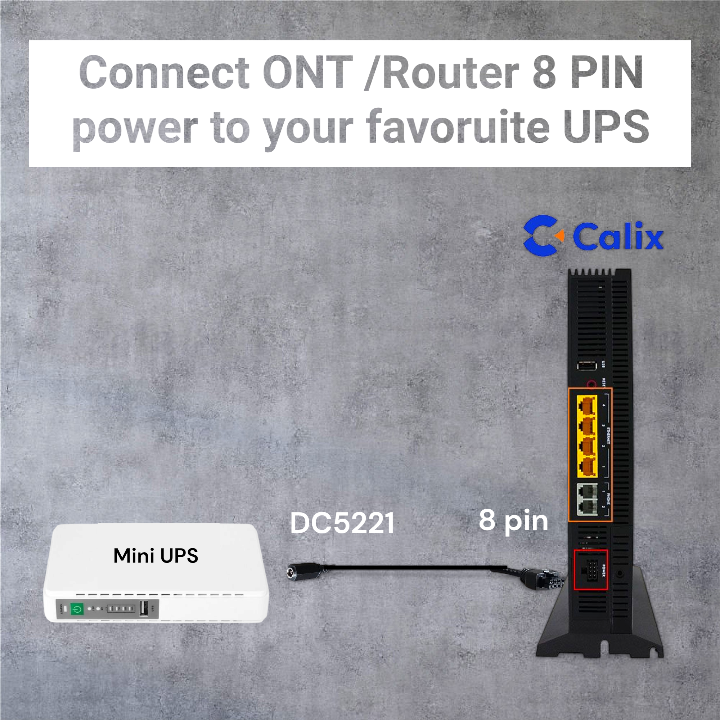
8 pin to DC 5221 UPS and Power Cable for Calix Routers and ONT
8 pin to DC 5221 UPS and Power Cable for Calix Routers and ONT
- Secure Payment
- 100% Satisfaction Guarantee
- Free Shipping over R1,500
Couldn't load pickup availability
Shipping Information
Shipping Information
FREE shipping on all orders over R1,500 — nationwide. Standard shipping calculated at checkout for orders under R1,500.
Fast delivery via The Courier Guy — 2–4 business days nationwide. Gauteng orders often arrive next-day
Tracked and delivered by The Courier Guy.
Returns & Exchanges: 14-day free returns — love it or your money back. Hassle-free exchanges. See our return policy for details.
To connect your Calix 813G, 844G, or 844E Gigaspire WiFi Routers or ONTs that have an 8-Pin Power Interface to an external in-line mini-UPS.
Device Compatibility Guide
| Supported Device | 8-Pin Connector Type | Mini-UPS Output Required | What's Included |
|---|---|---|---|
| Calix 813G | Molex Microfit 8-pin | DC 5.5 mm × 2.1 mm (DC5221) barrel plug | 1 × adapter cable (8-pin Microfit to DC5221 female) |
| Calix 844G | Molex Microfit 8-pin | DC 5.5 mm × 2.1 mm (DC5221) barrel plug | 1 × adapter cable (8-pin Microfit to DC5221 female) |
| Calix 844E | Molex Microfit 8-pin | DC 5.5 mm × 2.1 mm (DC5221) barrel plug | 1 × adapter cable (8-pin Microfit to DC5221 female) |
Quick Pin-Check
- Locate the 8-pin power socket on the back of your Calix device.
- Confirm the connector housing matches the Molex Microfit profile (rectangular, 2 × 4 pin layout).
- Plug the Microfit end of this cable into the device socket — it should click in firmly.
- Connect your mini-UPS output to the DC5221 female end of the cable.
- Power on — the DC5221 female connector gives you the freedom to connect any compatible mini-UPS.
Note: Only the Calix 813G, 844G, and 844E models with an 8-pin Microfit power interface are verified compatible. Do not use with devices that have a different connector type or pin count.
Share